Plan with purpose.
Use the lesson planning and calendar sections to map out what you want to teach and keep the bigger picture in view.
LESSON PLANS + CALENDARBring lesson planning, your gradebook and classroom organization together in one thoughtfully designed digital planner — so you can focus on the teaching.
A calmer way to plan
Digital planner · Designed for use in GoodNotes on iPad
Less searching. More clarity.
When lessons, class notes and student records live in different places, even a small task can interrupt your flow.
Open your planner. Find your focus. Give your teaching day a clearer starting point.
What's inside
From your first lesson plan to your end-of-day notes, keep the essentials close at hand.
Use the lesson planning and calendar sections to map out what you want to teach and keep the bigger picture in view.
LESSON PLANS + CALENDARBring student organization and attendance into your planning routine, with dedicated sections you can return to.
STUDENTS + ATTENDANCEKeep your grade records together so the information you enter is easier to review when it is time to check progress.
GRADEBOOK + TRACKINGGive classroom management and communication their own place alongside the lessons and students they support.
CLASSROOM + COMMUNICATIONUse planning tools, notes and wellness sections to keep your tasks, ideas and personal focus within reach.
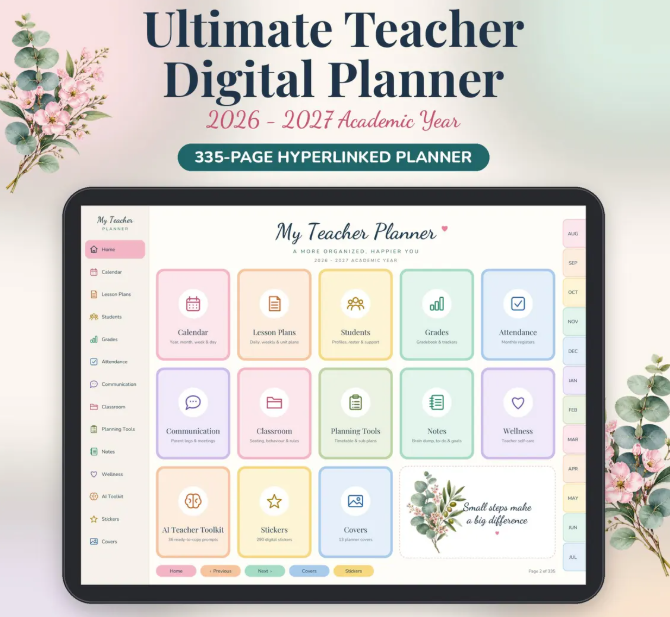
PLANNING + NOTES + WELLNESSExplore the AI Teacher Toolkit, stickers and planner covers shown in this edition's dashboard.
AI TOOLKIT + STICKERS + COVERSYour next teaching day starts here
Bring your classroom planning into one connected digital planner.
Meet your planner
The Ultimate Teacher Digital Planner brings your core teaching tools into a hyperlinked format designed for modern educators.
Use the dashboard to move between the sections that matter to your day, from lesson planning and student organization to your gradebook and classroom notes.
A simple planning routine
Make your digital planner part of the rhythm of your teaching day.
Use the planner in GoodNotes on your iPad and start from its connected dashboard.
Move into lesson plans, student organization, grades or classroom management using the hyperlinks.
Add your plans and records, revisit your notes and keep the day's priorities in one place.
Designed around educators
Bring the same care you put into your teaching to the way you organize your day.
Choose this if you enjoy planning on a tablet and want a dedicated space for your classroom work. It is a digital planner, rather than a physical book or school management system.
Keep lessons, student information and classroom tasks together.
Bring your teaching routine into a tablet-based planner.
Use a hyperlinked planner designed around your device.
Give planning, records and personal notes their own space.
Before you choose
This 335-page, hyperlinked 2026–2027 teacher planner brings together lesson planning, student organization, a gradebook, attendance, classroom management, communication, planning tools and notes. Its dashboard also includes wellness, an AI Teacher Toolkit, stickers and covers.
It is a digital planner for use on a compatible tablet. The product image illustrates it on an iPad; a physical planner, device and stylus are not part of this offer.
It is designed for GoodNotes on iPad. Other tablets and apps may handle planner files and hyperlinks differently, so confirm compatibility before you buy.
The planner's links help you navigate between its sections, making it easier to move from the dashboard to lesson planning, grades and other areas.
The edition shown is for the 2026–2027 academic year. Choose it with those academic-year dates in mind.
The offer includes grade tracking and organization. Automatic calculations or connections to a school's existing systems are not advertised as part of this planner.
Bring your planning together
Ultimate Teacher Digital Planner, Hyperlinked Lesson Planner, Gradebook & Classroom Organizer for GoodNotes iPad.
Please review the planner's academic year and device compatibility before purchasing. Device, stylus and note-taking app are not included.