YOUR TEACHING DAY, ALL TOGETHER2026–2027 edition · 335 hyperlinked pages
$197$17USD
Ultimate TeacherDigital Planner
FOR TEACHERS JUGGLING LESSONS, RECORDS & CLASSROOM ROUTINES

Less Planning Chaos.More Clarity For Every Teaching Day.

The Ultimate Teacher Digital Planner

Give your lessons, grades, student records and parent communication one organized home.
A hyperlinked teacher planner for GoodNotes on iPad, with printable editions and AI prompts included.

335 Hyperlinked Pages · 2026–2027 Edition

Take A Quick Look Inside

10-second product overview · Press play to watch

Get Your Teacher Planner

$197Only $17 USD
Pay with PayPal · One-time payment

Complete planner bundle · One payment · No subscription

Know Where Your Next Step Lives.

  • Plan lessons and your teaching calendar in one connected digital planner.
  • Keep student information and attendance together with your classroom plans.
  • Organize your grade records in a dedicated gradebook section.
  • Tap between hyperlinked sections to get to the part of your planner you need.
  • Bring classroom management and communication into your daily planning routine.
  • Keep notes, planning tools and wellness close at hand on your tablet.
  • Explore stickers, covers and an AI Teacher Toolkit included in this edition’s dashboard.
One planner for your 2026–2027 teaching year.
335Hyperlinked planner pages
2Printable editions
36Ready-to-copy AI prompts
290Digital stickers

Plus 13 planner covers and two setup guides · 2026–2027 academic year

What Makes This Planner
Different

Lesson planning, student organization, progress tracking and classroom resources — connected in one teacher planner.
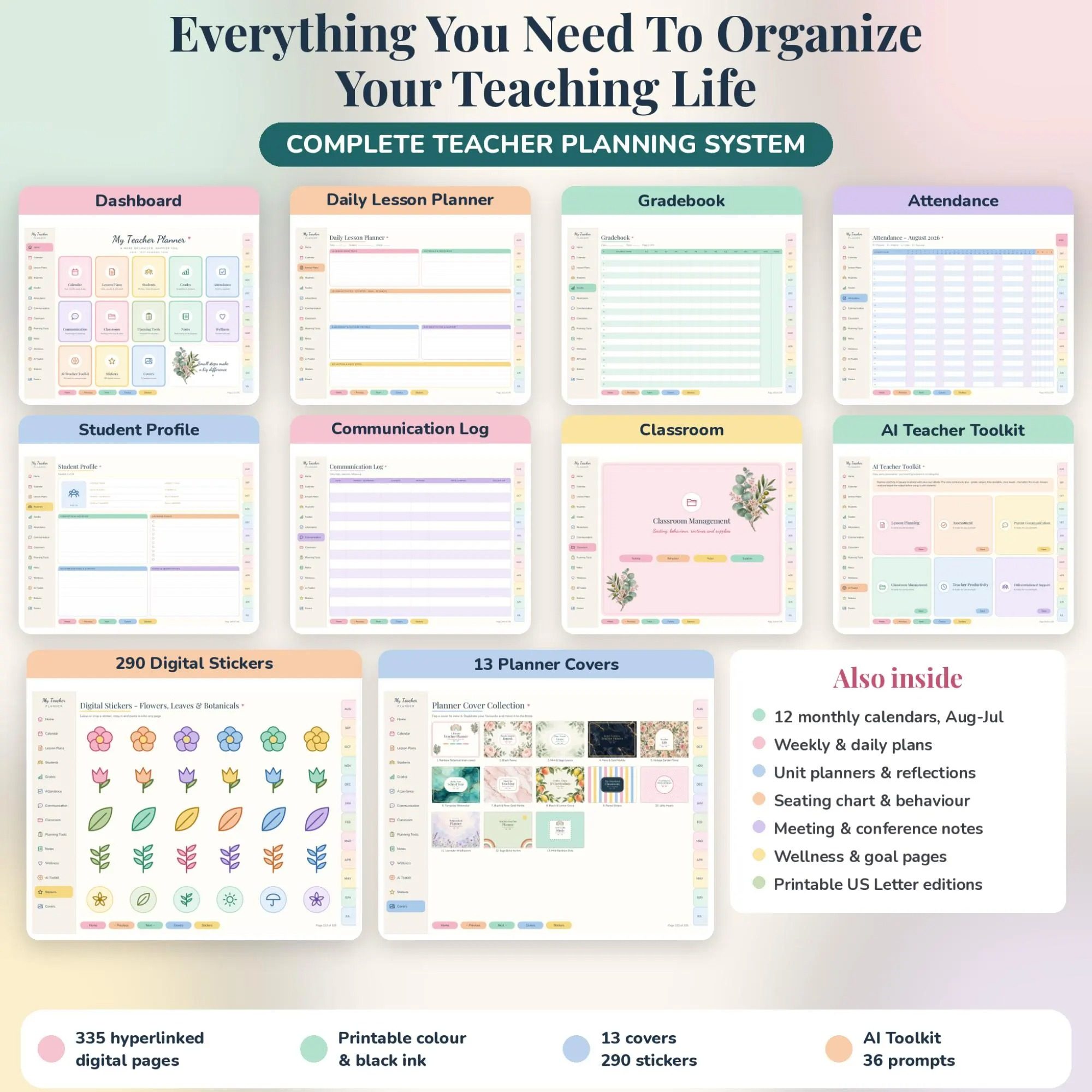
Teacher planner overview showing the dashboard, lesson planning, gradebook, attendance, student pages, AI toolkit, stickers and covers
A visual tour of the teaching tools inside your planner.Tap the image to view full size ↗

335 professionally designed planner pages. A dedicated place for the planning, records and notes that support your teaching day.

Fully hyperlinked navigation system. Move between planner sections using the built-in links.

Interactive teacher dashboard. Open the section you need from one connected starting point.

Lesson planning templates. Prepare daily, weekly, monthly and unit plans.

Student management tools. Keep profiles, class rosters, goals and student notes organized.

Gradebook and assignment tracking. Record grades, track assignments and follow missing work.

Attendance tracking. Keep class attendance records alongside your teaching plans.

Parent communication pages. Organize contacts, conversations, meetings and follow-ups.

Classroom organization resources. Keep seating charts, procedures and supply information in one place.

Bonus AI Teacher Toolkit. 36 practical prompts for lessons, assessments, parent communication, classroom management, productivity and differentiation.

Digital stickers and planner covers included. Personalize your digital planning experience.

Get Your Ultimate Teacher Digital Planner

$197Only $17 USD
Pay with PayPal · One-time payment

Designed for GoodNotes on iPad

335 hyperlinked pages2026–2027 academic year13 dashboard sections

Digital product. Device, stylus and note-taking app are separate.

ONE TEACHER PLANNER. Lessons, grades, students & classroom organization.

Bring Your Teaching Week
Out Of The Scattered-Notes Cycle.

Lesson ideas here. Grade notes there. A parent message to follow up. Give each responsibility a place you can return to.

Scattered Across Your Day

Illustration of a scattered planning routine

  • Lesson ideas, grades and reminders in different places.
  • Extra searching when you need a particular note.
  • Classroom information spread across your planning tools.

Connected In Your Planner

Illustration of a connected planning routine

  • Dedicated sections for lessons, grades and classroom work.
  • Hyperlinked navigation between the sections you need.
  • One digital planner to bring your records and ideas together.

Open one dashboard. Find your next step.
Give your teaching day a more organized start.

A simple digital planning routine

Open. Tap. Plan.
Then Get Back To Teaching.

Make your planner part of the way you prepare for class.

STEP 1 · OPEN

Open Your Teacher Planner

Use the planner in GoodNotes on your iPad and start from its connected dashboard.

STEP 2 · CHOOSE

Tap The Section You Need

Move into lesson plans, students, grades or classroom management using the planner’s hyperlinked navigation.

STEP 3 · PLAN

Build Your Teaching Routine

Add your plans and records, revisit your notes and keep the day’s priorities together in one place.

A dedicated home for your classroom planning,
from your first lesson idea to your end-of-day notes.

Take A Closer Look Inside
Your Ultimate Teacher Planner

13 dashboard sections shown in the 2026–2027 edition.
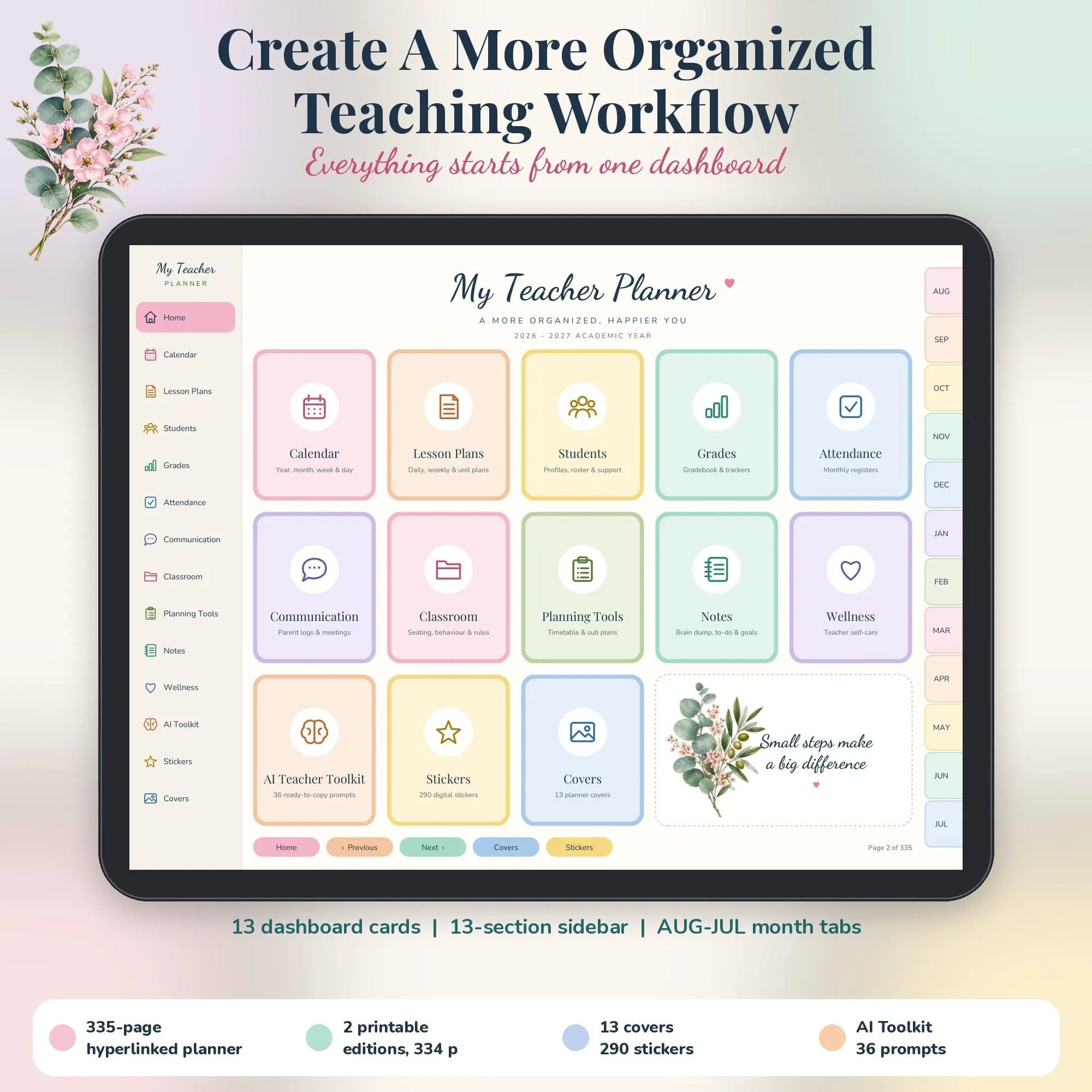
Teacher dashboard with 13 cards, a section sidebar and August to July month tabs
Your planning day starts from one dashboard.Tap the image to view full size ↗

Your Classroom World.
One Connected Dashboard.

Bring your teaching essentials together in a 335-page planner designed around the way educators organize their day.

Calendar
Lesson Plans
Students
Grades
Attendance
Communication
Classroom
Planning Tools
Notes
Wellness
AI Teacher Toolkit
Stickers
Covers

Choose a section, add your plans and return to what matters next.

FIND YOUR PLACE

From Your Dashboard
To The Page You Need.

Use the dashboard cards, sidebar and month tabs to move between your classroom essentials.

  • Start with a section. Lessons, students, grades, attendance and more.
  • Jump to the month. August 2026 through July 2027.
  • Keep moving. Home, Previous and Next buttons support your planning flow.

Open links using the navigation mode supported by your PDF annotation app.
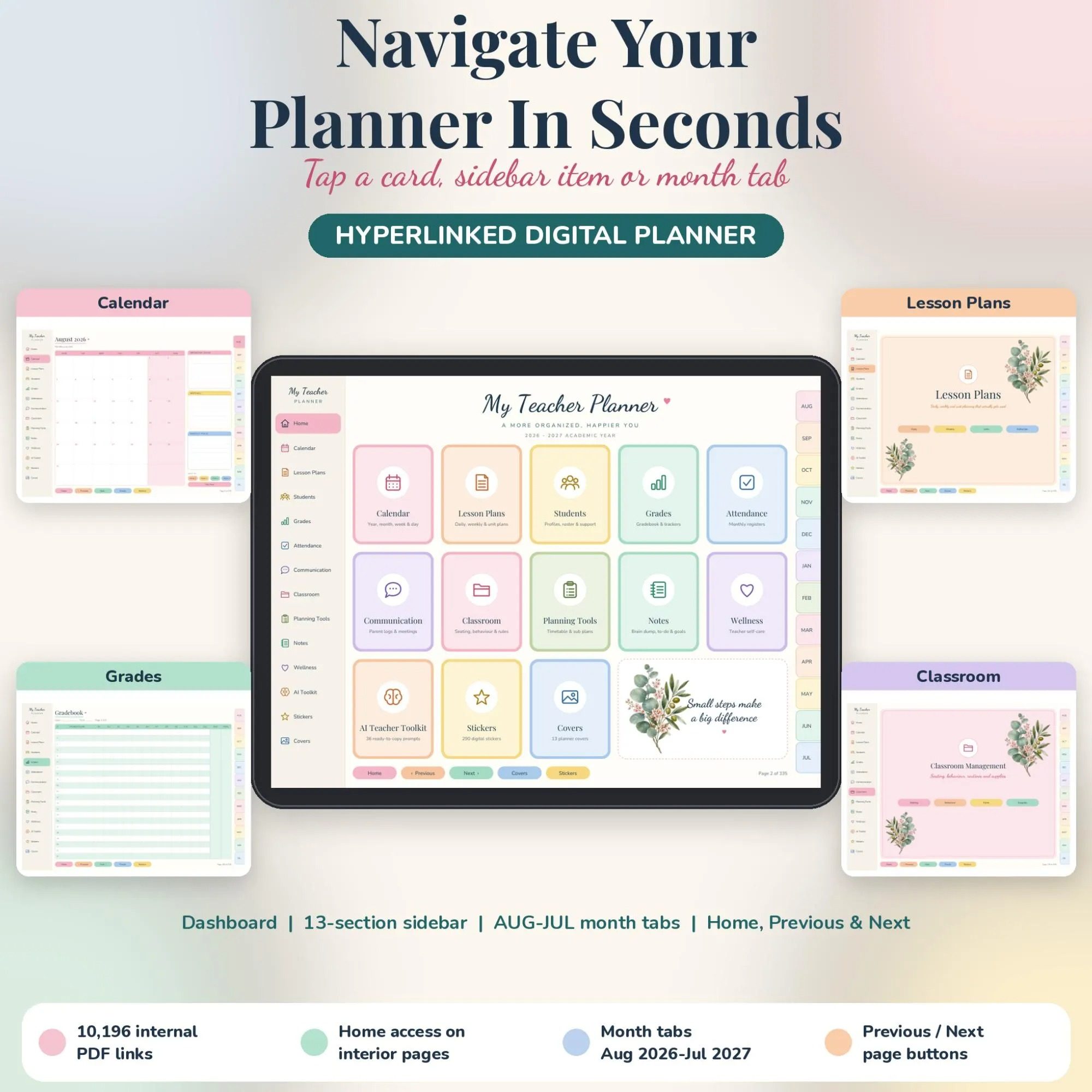
Hyperlinked teacher planner navigation with dashboard cards, calendar, lesson plans, grades and classroom pages
See the dashboard, sidebar and month tabs in action.Tap the image to view full size ↗

Practical Tools For Your Lessons.
A Clearer Place For Classroom Life.

Explore the planning templates, student pages, tracking tools and communication resources included in your planner.
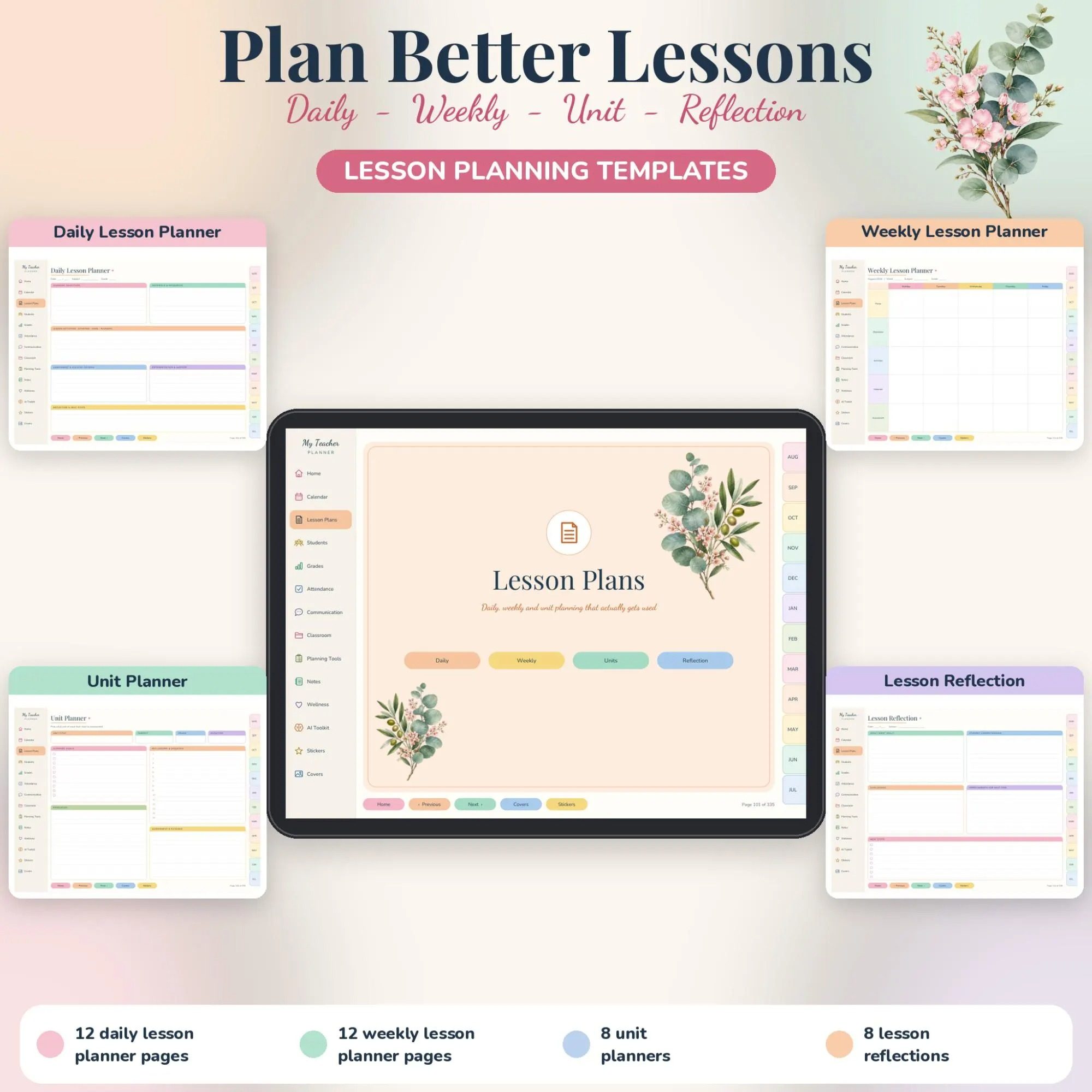
Daily and weekly lesson plans, unit planners and lesson reflection templates
Plan the lesson. Prepare the materials. Reflect on what worked.Tap the image to view full size ↗

Lesson Planner & Teaching Tools

Plan your teaching with:

  • Daily lesson plans
  • Weekly lesson plans
  • Monthly planning pages
  • Unit planners
  • Lesson reflections
  • Learning objectives
  • Materials planning
  • Differentiation strategies
  • Assessment tracking

Perfect for teachers who need a practical lesson planner for everyday classroom preparation.
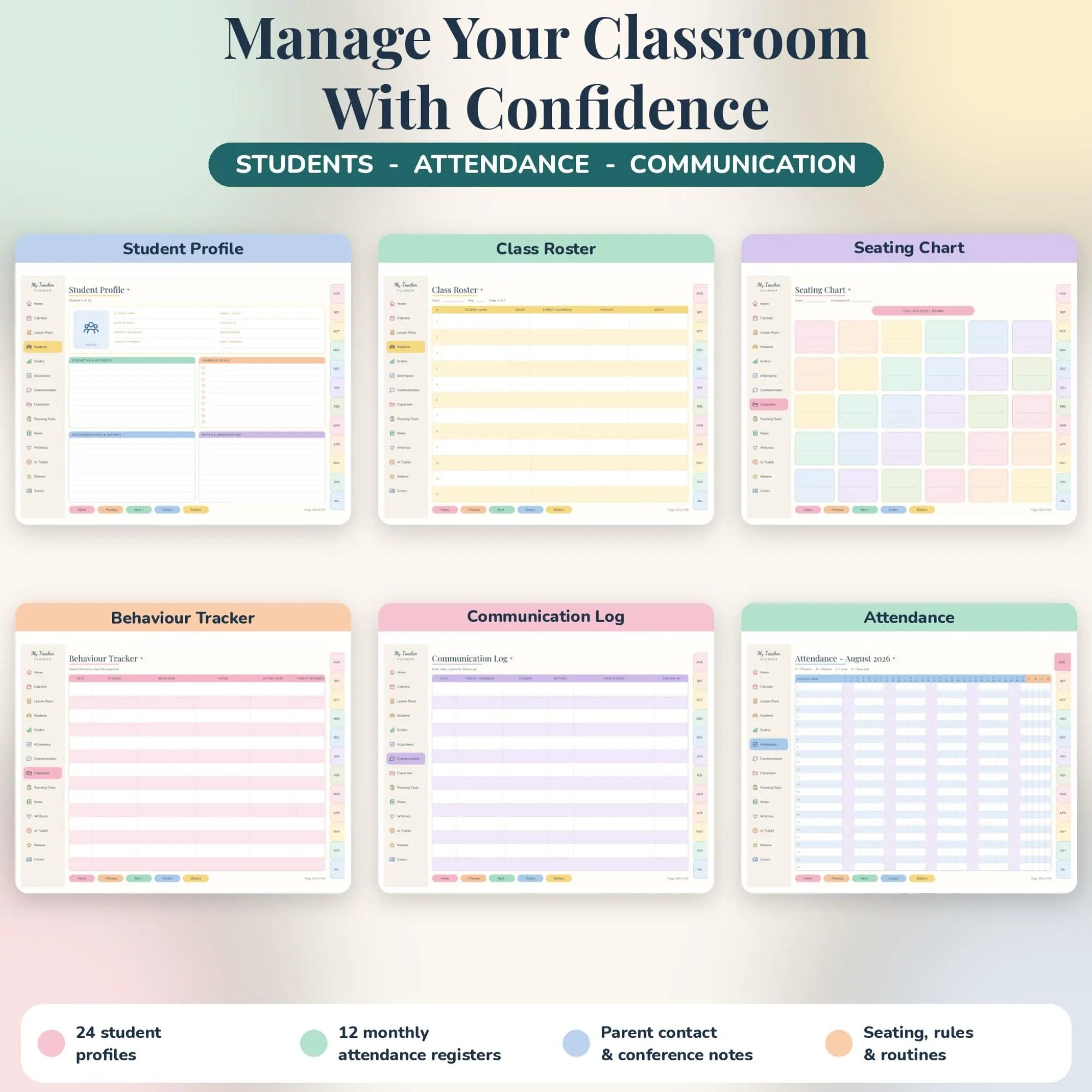
Student profiles, class roster, seating chart, behaviour tracker, communication log and attendance pages
Student information, attendance and classroom routines together.Tap the image to view full size ↗

Classroom & Student Organization

Keep important classroom information organized:

  • Student profiles
  • Class roster
  • Student notes
  • Student goals
  • Intervention tracker
  • Accommodation notes
  • Seating charts
  • Classroom procedures
  • Supply inventory

Grades, Tracking & Assessments

Manage student progress using:

  • Gradebook pages
  • Assignment tracker
  • Grade tracking pages
  • Assessment records
  • Progress monitoring
  • Missing work tracking

Parent Communication

Stay prepared with:

  • Parent contact pages
  • Communication logs
  • Meeting notes
  • Conference notes
  • Follow-up tracking
Included With Your Planner

Start With A Prompt. Make It Your Own.

BONUS AI Teacher Toolkit

36 ready-to-copy prompts. Six practical categories. Included with your complete planner bundle.
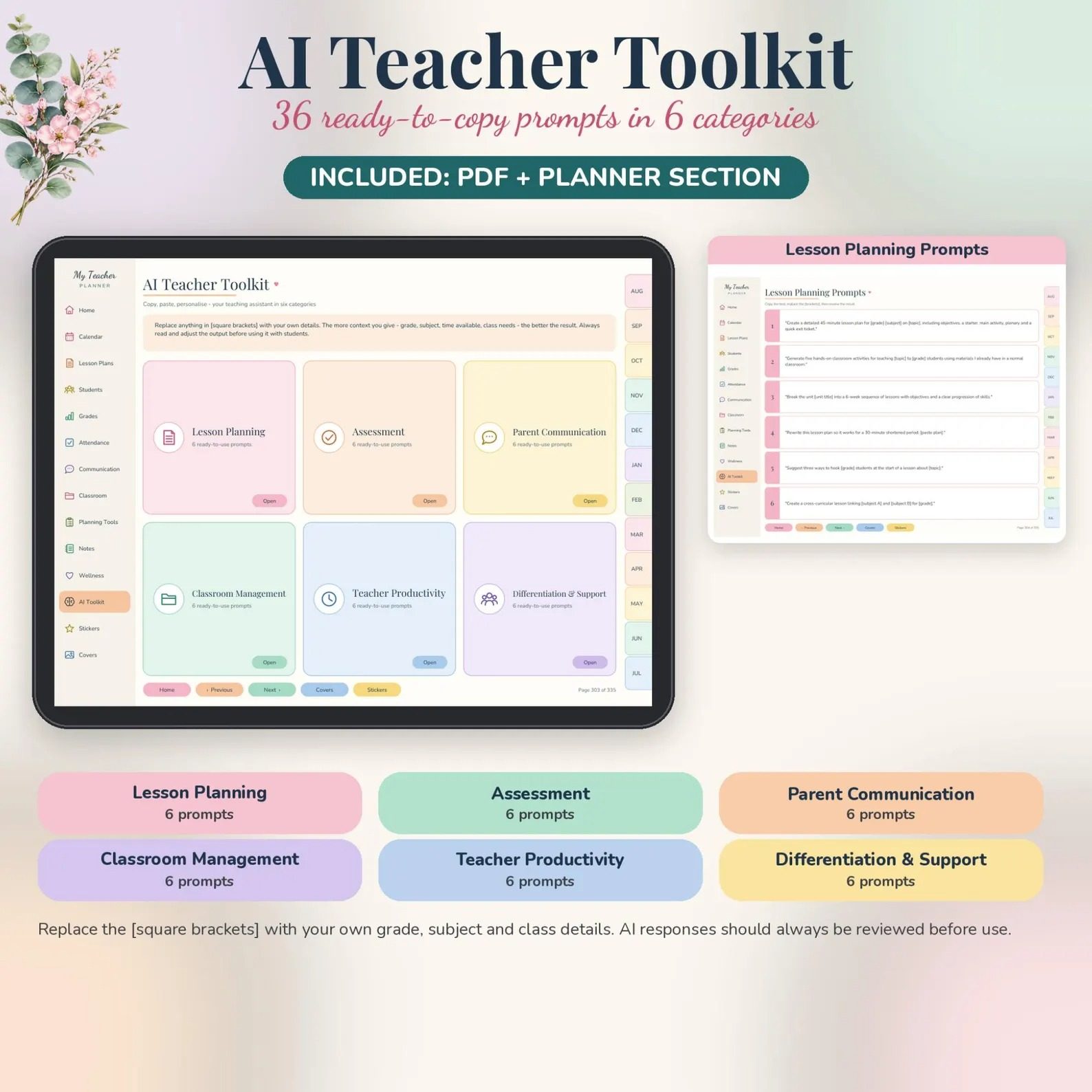
AI Teacher Toolkit showing 36 ready-to-copy prompts across six teaching categories
Your AI prompt collection, included as a PDF and planner section.Tap the image to view full size ↗

Lesson Planning

Practical prompts to support your lesson preparation and teaching ideas.

Assessment Creation

Practical prompts to help you prepare questions and assessment activities.

Parent Communication

Practical prompts for clear parent updates, messages and follow-ups.

Classroom Management

Practical prompts to support classroom routines and everyday situations.

Teacher Productivity

Practical prompts for organizing your priorities, tasks and teaching workflow.

Differentiation & Support

Prompts to help you adapt ideas to different learners and classroom needs.

Six prompts per category. Personalize them for your grade, subject and class.

Replace the bracketed details, then review and adapt AI responses before classroom use.

There’s More Inside
To Make Planning Feel Like You.

Small personal touches that make this planner feel like yours.

Inside the dashboard

290 Digital Stickers

Decorate and label your plans with sticker sheets and individual transparent PNGs.

Inside the dashboard

13 Planner Covers

Choose a cover design for your teacher planner and make your workspace your own.

Your Tablet. Your Paper Planner.
Your Way To Prepare.

Plan digitally or print the pages you need. Both formats are included in the complete bundle.
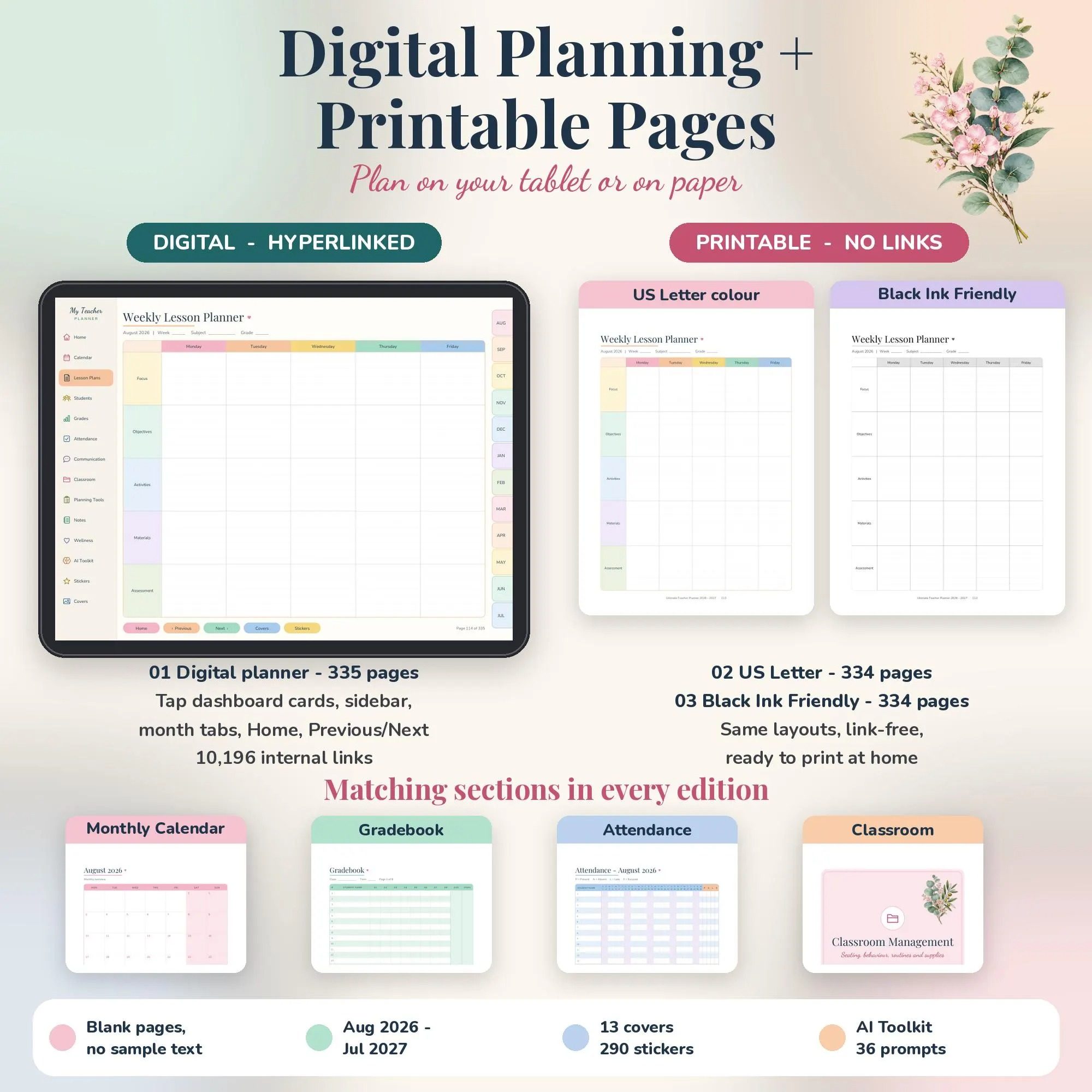
335-page hyperlinked digital planner beside the 334-page colour and black-ink-friendly printable editions
Digital navigation for your tablet. Link-free pages for printing.Tap the image to view full size ↗
THREE EDITIONS, ONE BUNDLE

Choose The Format
That Fits Your Day.

335Hyperlinked digital pagesNavigate with dashboard cards, a sidebar and month tabs.
334Colour printable pagesUS Letter layouts for planning on paper.
334Black-ink-friendly pagesA greyscale printable edition of the same layouts.

The two printable editions are link-free. Dated calendar pages cover August 2026–July 2027.
Made For Educators Who Want
A Clearer Planning Routine.

  • ✓Classroom teachersKeep lessons, student information and classroom tasks together.
  • ✓Educators moving to digital planningBring your teaching routine into a dedicated tablet-based planner.
  • ✓GoodNotes and iPad usersUse a hyperlinked planner designed for your app and device.
  • ✓Teachers balancing many responsibilitiesGive plans, records, communication and personal notes their own place.
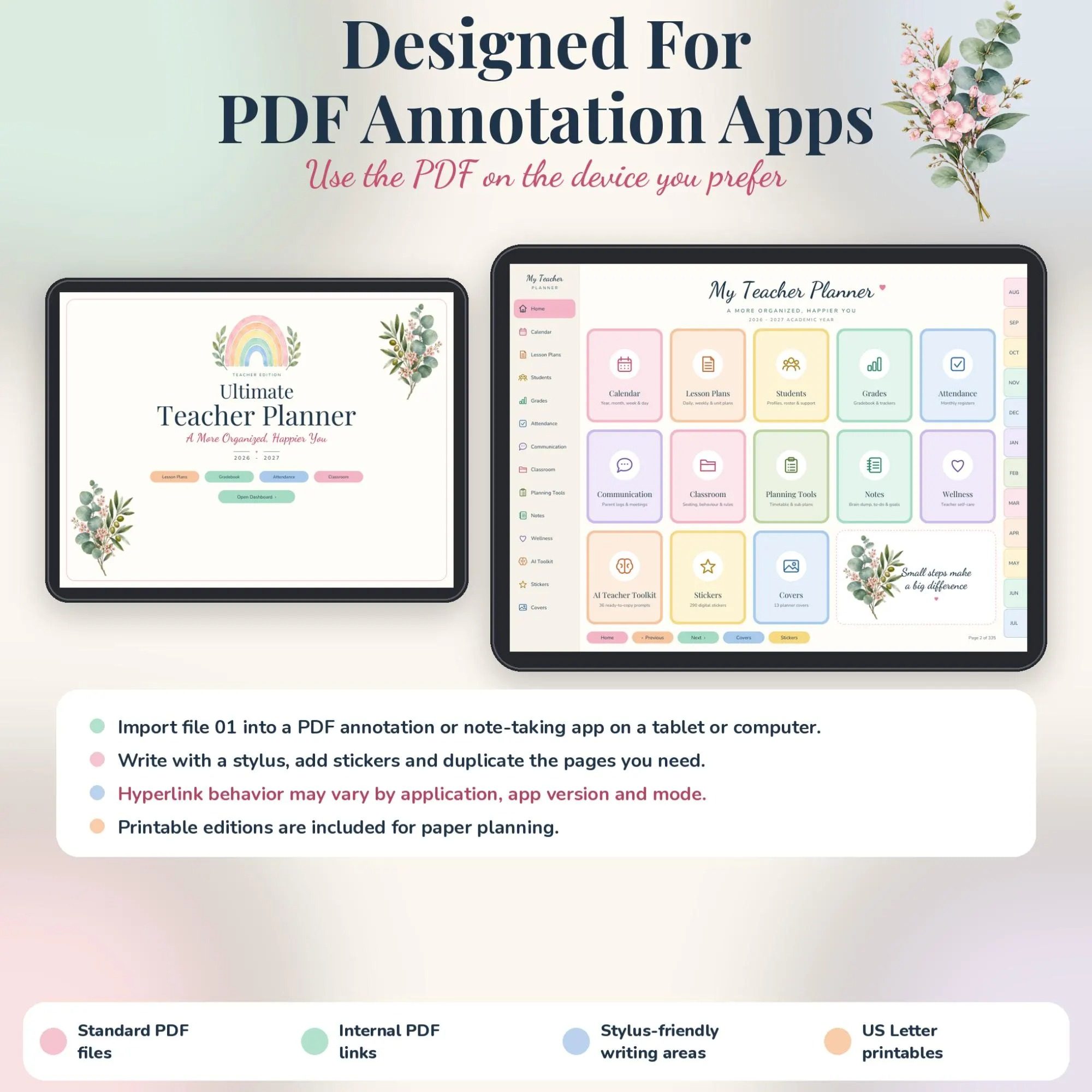
Teacher planner cover and dashboard shown in PDF annotation apps on tablets
A PDF planner for your preferred compatible device and annotation app.Tap the image to view full size ↗

Your Complete Teaching Toolkit.
One Simple Purchase.

See every resource in the current complete bundle, together in one clear package.
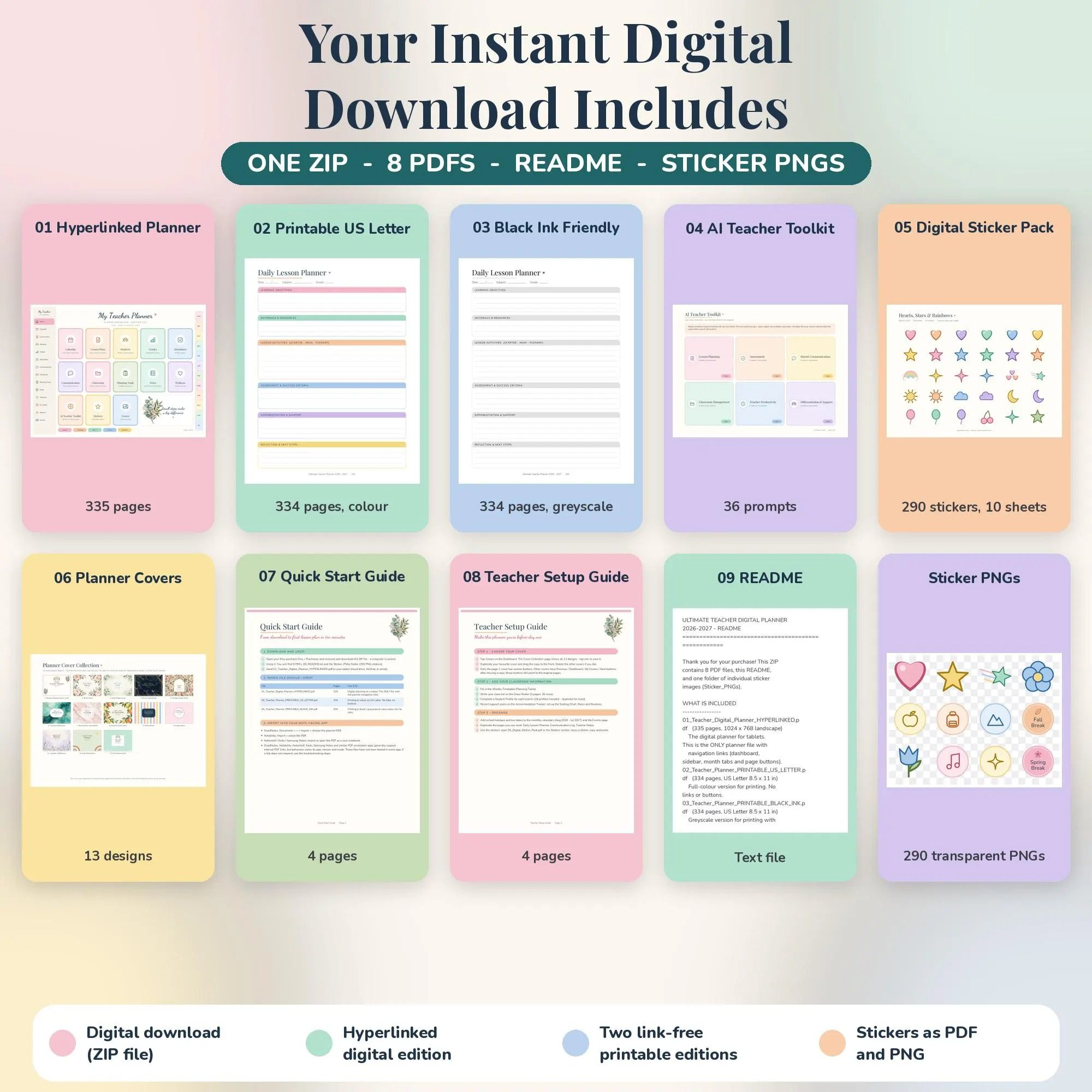
ULTIMATE TEACHER DIGITAL PLANNER · 2026–2027
Download package overview with the digital planner, printable editions, AI toolkit, stickers, covers, guides and README
Your bundle at a glance: eight PDFs, a README and sticker PNGs.Tap the image to view full size ↗

EVERYTHING IN THE COMPLETE BUNDLE

Your Teaching Essentials,
All Accounted For.

  • 01335-page hyperlinked plannerLessons, student records, grades, attendance, classroom tools and more.Included
  • 02Two printable editions334 pages each: US Letter colour and black-ink-friendly layouts.Included
  • 0336 AI Teacher Toolkit promptsSix categories, from lesson planning to differentiation and support.Included
  • 04290 digital stickersSticker sheets plus individual transparent PNG files.Included
  • 0513 planner cover designsPersonalize the look of your teacher planner.Included
  • 06Quick Start + Teacher Setup guidesTwo four-page guides, plus a README to help you get oriented.Included
SAVE $180
$197Only $17 USD
Pay with PayPal · One-time payment

One-time purchase · 2026–2027 edition · Digital files

A place for the next lesson, the next student note and the next teaching day.

Frequently Asked
Questions

What is included in the planner?

The 335-page, hyperlinked 2026–2027 edition brings together calendar and lesson planning, student organization, grades, attendance, communication, classroom management, planning tools, notes and wellness. The complete bundle also includes two 334-page printable editions, 36 AI prompts across six categories, 290 digital stickers, 13 covers, a Quick Start Guide and a Teacher Setup Guide.

Is this a physical book?

This is a digital teacher planner. A physical planner, iPad, stylus and note-taking app are not included in the offer.

Which app and device is it designed for?

It is designed for GoodNotes on iPad. Before purchasing for another app or tablet, check that it supports the planner’s file format and hyperlinks. GoodNotes and the device are separate from this purchase.

Is the $17 payment recurring?

No. The connected checkout is set to a one-time payment of $17 USD for the Ultimate Teacher Digital Planner. It is not a subscription.

Is this an undated planner?

No. This is the August 2026–July 2027 academic-year edition. Choose it if those dates suit your planning needs.

Does the gradebook calculate grades automatically?

Treat it as a digital planner for recording and organizing grades. Automatic calculations, student databases and school-system integrations are not part of the confirmed offer.

What do the hyperlinks do?

They help you navigate between planner sections. Use your app’s supported link-navigation mode to move around the planner.

How do I place an order?

Use a green purchase button to open the Teacher Planner checkout, review the $17 USD total, enter your details and select the available PayPal payment option.